
Conversion from NFA to RE
Getting Started
Access the Simulation Interface
- The main panel displays the current NFA state diagram with labeled states and transitions
- The Quick Guide on the left provides step-by-step instructions for the conversion process
- Control buttons are arranged horizontally at the top for easy access
Choose Your NFA
- Click the "Change NFA" button to cycle through 4 different sample NFAs
- Each NFA has varying complexity levels, from simple branching to advanced diamond structures
- The current NFA description appears above the state diagram
- Select an NFA that matches your learning level or specific interests
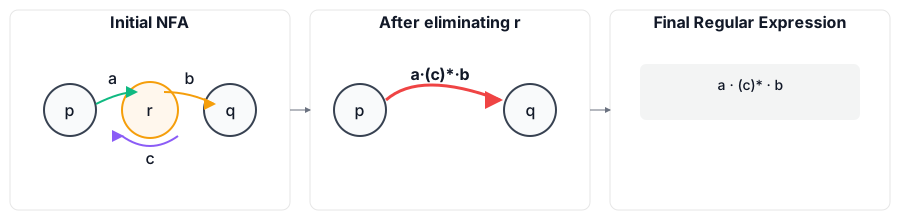
State Elimination Process
Initialize Conversion
- Click "Start Conversion" to begin the transformation process
- The system prepares the NFA for state elimination by identifying eligible intermediate states
- Start and accept states are highlighted and cannot be eliminated
- The current regular expression display shows "Conversion started"
Select States for Elimination
- Click directly on any intermediate state in the diagram to select it for elimination
- Selected states are highlighted with a distinct visual indicator
- Only non-start, non-accept states can be selected (start and accept states appear dimmed)
- The "Eliminate State" button becomes enabled when a valid state is selected
Execute State Elimination
- Click "Eliminate State" to remove the selected state from the NFA
- Watch as the system recalculates all transition paths around the eliminated state
- Incoming transitions to the eliminated state are identified and marked
- Outgoing transitions from the eliminated state are traced and highlighted
- Self-loops on the eliminated state are incorporated using Kleene star operations
Observe Regular Expression Construction
- The "Current Regular Expression" panel updates in real-time during elimination
- New transition labels are constructed using regex operations:
- Concatenation: Sequential path combinations (incoming + self-loop* + outgoing)
- Union: Multiple parallel paths between the same states
- Kleene Star: Self-loops converted to repetition patterns
- Expression simplification occurs automatically using algebraic laws
Controls
Navigation and Review
- Use "Step Back" to undo the last elimination and return to the previous state
- The system maintains a complete history of elimination steps for review
- Compare different elimination orders by stepping back and choosing alternative states
- Observe how elimination order affects intermediate expression complexity
Reset and Retry
- Click "Reset" to return the current NFA to its original state
- All eliminated states are restored with their original transitions
- The regular expression display returns to the initial "Click Start Conversion" message
- Experiment with different elimination sequences for the same NFA